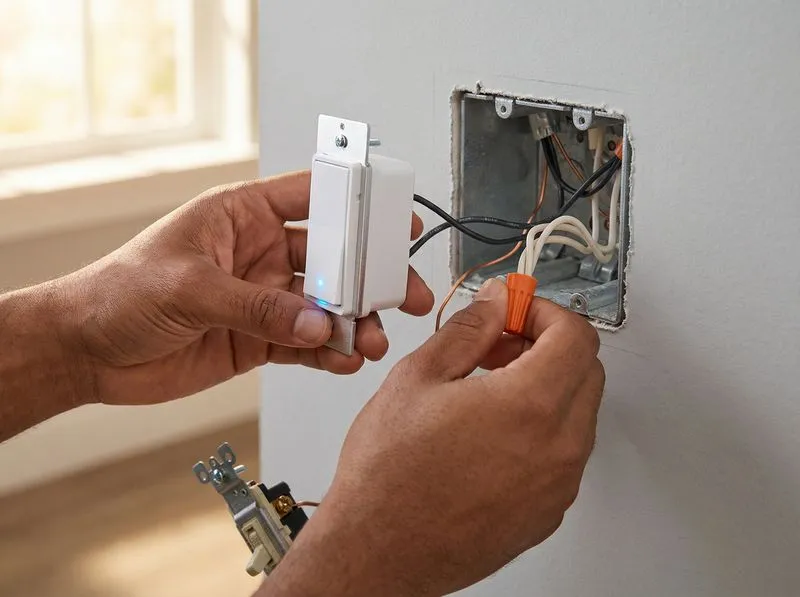
Smart thermostats, smart switches, video doorbells, security cameras, voice assistants, automated lighting — the smart home market has moved past novelty and into standard equipment for many Atlanta homeowners. But here is what the product marketing never mentions: most smart home problems are electrical problems. Devices that drop offline, switches that will not pair, and cameras that freeze mid-stream are usually symptoms of inadequate wiring, missing neutral wires, or overloaded circuits — not bad hardware.
Getting the wiring right before you fill your house with smart devices saves you from months of troubleshooting. This guide covers the electrical foundation your smart home needs to work reliably.
The Neutral Wire Problem
The single most common issue with smart switch installations in older Atlanta homes is a missing neutral wire in the switch box. Most smart switches need a neutral wire (the white wire) to maintain power to their internal electronics when the light is turned off. Without a constant trickle of power, the switch cannot maintain its Wi-Fi connection, cannot respond to voice commands, and cannot receive scheduled automations.
Homes built before the mid-1980s commonly ran only the hot wire (black) and the switch leg (also in the black/red family) to the switch box, with the neutral wire staying in the ceiling box at the light fixture. The switch simply interrupted the hot wire — no neutral needed for a dumb switch.
Solutions for Missing Neutral Wires
- Run a neutral wire. This is the most complete fix. An electrician pulls a new cable from the light fixture box to the switch box, providing the neutral that modern smart switches require. Cost: $150 to $300 per switch location depending on accessibility.
- Use a no-neutral smart switch. Lutron Caseta and a few other brands offer smart switches that work without a neutral wire by using a proprietary wireless bridge and dimmer technology. They work well but limit your ecosystem options.
- Use smart bulbs instead of smart switches. Smart bulbs screw into standard fixtures and do not need any wiring changes. The downside: anyone who turns off the physical switch kills the smart bulb's power and connectivity. You lose remote control until the switch is turned back on.
Dedicated Circuits for Smart Home Hubs
A smart home hub, a network-attached storage (NAS) device, a security camera DVR, or a home server should be on a dedicated circuit — separate from general-purpose outlets. Why? Because a dedicated circuit isolates the hub from power fluctuations caused by large loads cycling on and off on shared circuits. When the AC compressor kicks on and causes a momentary voltage dip, you do not want your home automation hub resetting.
A dedicated 15-amp circuit for the smart home closet or equipment shelf costs $250 to $500 to install and is cheap insurance against the frustration of devices dropping offline every time the dryer starts.
Pro Tip
Run at least one Cat6 Ethernet cable to every room while the walls are accessible. Wi-Fi is convenient, but hardwired connections are faster, more reliable, and do not compete for bandwidth with your 47 other wireless devices. Retrofitting Ethernet after the walls are finished costs 3-4 times more.
Structured Wiring: Planning for the Future
Structured wiring is a planned approach to running power, data (Ethernet), and low-voltage cables through your home from a central distribution point. Instead of ad-hoc cable runs added over time, structured wiring provides a clean, organized infrastructure that can be expanded as your needs grow.
What to Include in a Structured Wiring Plan
- Cat6 Ethernet to every room. Wi-Fi is convenient, but hardwired Ethernet is faster, more reliable, and does not compete for bandwidth with your 47 other wireless devices. Run at least one Cat6 drop to every bedroom, the living room, the home office, and the garage. Two drops to any room that will have a desktop computer or gaming console.
- Dedicated Ethernet runs to security camera locations. PoE (Power over Ethernet) cameras get both power and data from a single Ethernet cable, eliminating the need for power outlets at each camera location. Plan camera positions during the wiring phase, not after.
- Central patch panel. All Ethernet runs terminate at a central patch panel, usually in a closet, utility room, or garage. The panel connects to your router and network switch, giving you a single point of management for the entire home network.
- Conduit for future runs. Even if you do not need a cable run today, installing empty conduit from the attic to key locations gives you an easy path for future upgrades without opening walls.
Structured Wiring Costs
For a typical Atlanta home, structured wiring during new construction or a major renovation costs $1,500 to $4,000, depending on the number of drops and the complexity of the run. Retrofitting structured wiring in an existing home costs more — $2,500 to $6,000 — because running cable through finished walls requires more labor. Either way, it is a one-time investment that pays dividends for decades.
Free Download: Seasonal Electrical Maintenance Checklist
Keep your home's electrical system safe year-round with our printable seasonal checklist — built by a master electrician.
Get the Free ChecklistSmart Switches and Dimmers: What to Know
Smart switches replace your existing wall switches and connect to your Wi-Fi network (or a proprietary wireless protocol like Zigbee, Z-Wave, or Lutron's ClearConnect). They let you control lights via an app, voice assistant, or automation schedule.
Choosing the Right Smart Switch
- Wi-Fi switches (TP-Link Kasa, Meross) connect directly to your router. No hub required. Simple to set up, but each switch adds a device to your Wi-Fi network, which can strain consumer routers if you have 30+ devices.
- Zigbee/Z-Wave switches (GE/Jasco) require a hub (Samsung SmartThings, Hubitat) but use a separate wireless mesh network that does not load your Wi-Fi. Better for large installations with many switches.
- Lutron Caseta uses a dedicated bridge and its own radio protocol. Extremely reliable, works without neutral wires, and integrates with nearly every smart home platform. The premium option for whole-home smart lighting.
Dimmer Compatibility
Smart dimmers must be compatible with your light bulbs. LED bulbs require dimmers rated for LED loads — using an incandescent dimmer on LED bulbs causes flickering, buzzing, and premature bulb failure. Check the dimmer manufacturer's compatibility list before purchasing. Lutron publishes the most comprehensive bulb compatibility database in the industry.
Electrical Panel Considerations for Smart Homes
A smart home with an EV charger, smart appliances, and a home server adds more circuits and more total load than a traditional home. If your panel is already near capacity, adding smart home infrastructure may trigger the need for a panel upgrade.
Smart panels — like the Span or Leviton smart load centers — take this a step further by giving you per-circuit monitoring and control from a smartphone app. You can see exactly how much power each circuit draws, set up alerts for unusual usage, and even turn off individual circuits remotely. Smart panels cost 2 to 3 times more than a standard panel but provide a level of visibility and control that makes sense for highly automated homes.
Outdoor Smart Devices and Weatherproofing
Outdoor smart devices — cameras, pathway lights controllers, smart outlets — need weatherproof electrical connections. In Atlanta's climate, that means:
- Weather-resistant outlets (WR): Required by code for all outdoor receptacles. These outlets have corrosion-resistant contacts and are paired with in-use covers that seal the outlet while a plug is inserted.
- GFCI protection: All outdoor outlets must have GFCI protection. A GFCI breaker in the panel or a GFCI outlet at the first device in the circuit satisfies this requirement.
- In-use covers: Standard flat covers only protect the outlet when nothing is plugged in. In-use (bubble) covers protect the outlet and the plug connection during use — required anywhere an outdoor outlet may have a device plugged in for extended periods.
See our outdoor electrical services page for more on exterior wiring.
Pro Tip
Smart home devices are only as reliable as the wiring they run on. The most expensive smart switch in the world does not work without a neutral wire and a stable circuit. Start with the infrastructure, then add the technology.
Common Smart Home Wiring Mistakes
- Overloading the Wi-Fi network. Thirty smart devices on a consumer-grade router leads to dropped connections. Invest in a mesh Wi-Fi system or run Ethernet to access points in each zone of the home.
- Skipping the neutral wire check. Buy the smart switch first, then discover the switch box has no neutral. Check every switch box before ordering hardware.
- Ignoring surge protection. A smart home full of electronics is a smart home vulnerable to power surges. A whole-home surge protector at the panel costs $300 to $500 installed and protects every device in the house from utility surges and lightning.
- Running everything on one circuit. The home office with a desktop, monitor, router, NAS, and smart hub should not share a 15-amp circuit with the living room lamps and TV.
- No backup power plan. Smart locks, security cameras, and alarm panels lose function during a power outage unless you have a battery backup setup.
At JD Works Electrical, we help Atlanta homeowners build smart home electrical infrastructure that works — neutral wire additions, dedicated circuits, structured wiring, smart panel installations, and outdoor connections. We work with your smart home installer or directly with you to plan the electrical backbone before the first device goes on the wall. See our full service list or contact us to plan your smart home wiring.
Frequently Asked Questions
Most smart switches require a neutral wire to maintain power to their Wi-Fi radio when the light is off. Homes built before the mid-1980s often lack neutral wires in switch boxes. Some switches, like the Lutron Caseta, work without a neutral wire using a proprietary bridge. If you are planning a significant smart home build-out, adding neutral wires to switch boxes is a worthwhile investment.
Smart devices themselves draw very little power — less than 1 watt each. The circuit capacity is determined by the total wattage of the loads plugged in, not the number of smart devices controlling them. A 15-amp circuit handles 1,800 watts regardless of whether the outlets are smart or standard. The bottleneck is usually your Wi-Fi network, not the electrical circuit.
For permanent installations like smart switches and thermostats, hardwired power is more reliable than battery options. For network connectivity, Wi-Fi works for most devices, but security cameras and media streamers benefit from hardwired Ethernet. A hybrid approach — hardwired power with Wi-Fi for most devices and Ethernet for cameras — is the most practical setup for most homes.
Building a Smart Home? Start With the Wiring.
JD Works Electrical installs the electrical infrastructure that makes smart homes work — neutral wires, dedicated circuits, structured wiring, and more. Serving all of metro Atlanta.
Plan Your Smart Home Wiring